
Download ZK Player APK – Video Player, Free, Android, Offline, Subtitles, Kids Lock
Overview
ZK Player is a free multimedia application designed for Android devices, developed by XTApp. The software serves as a versatile video player, enabling users to watch movies, TV shows, and listen to music with a range of built-in functionalities. It is tailored for individuals seeking a reliable and feature-rich media playback solution on their mobile devices. The app supports both online and offline video playback, making it suitable for users who want to enjoy content without relying on a constant internet connection.
One of the core purposes of ZK Player is to streamline media consumption by allowing users to collect and organize videos directly on their device. This feature enhances accessibility and reduces dependency on streaming platforms. The app also supports subtitle downloads, which is particularly beneficial for users who prefer watching content in different languages or require accessibility features. Additionally, the inclusion of a Kids Lock screen indicates a focus on family-friendly usage, helping parents manage screen time and prevent accidental access to other applications or settings.
Real-world usage scenarios include watching downloaded movies during travel, enjoying local media files at home, or sharing content with children using the locked interface. While the developer did not provide additional system requirements, the app’s lightweight size of 20.3 MB suggests efficient resource management. The software is intended for general consumers and mobile media enthusiasts who value convenience, customization, and offline functionality.
Key Features & Capabilities
- Offline and Online Playback: Users can play videos both from local storage and online sources, offering flexibility in content access regardless of internet availability.
- Video Collection Functionality: The ability to collect and organize videos directly on the device allows for easy management of personal media libraries without cloud dependency.
- Subtitle Download Support: Users can download subtitles in various languages, enhancing accessibility and comprehension for international content. Kids Lock Screen: A dedicated parental control feature that locks the interface to prevent children from navigating outside the video player or accessing other apps.
- Customizable Interface: The user interface can be adjusted with simple modifications, allowing users to personalize their viewing experience.
These features are designed to improve user experience by reducing friction in media consumption. For example, users can download a movie before a flight and play it offline without needing to stream. Similarly, subtitle downloads enable viewers to follow dialogue in foreign language content without external tools. The Kids Lock screen ensures safe, focused viewing for younger audiences, making it ideal for family use. The customizable interface allows users to adapt the app’s layout and appearance to their preferences, increasing usability and satisfaction.
User Interface, Workflow & Performance
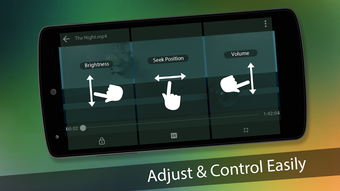
The user interface of ZK Player is designed to be intuitive and user-friendly, with a focus on simplicity and ease of navigation. The layout appears structured around core media playback functions, including play, pause, seek, and volume controls. Menus are accessible through clear icons and organized panels, minimizing the need for advanced technical knowledge.
Workflow efficiency is enhanced by the app’s ability to quickly load and play videos from local storage. Users can browse their device’s file system directly within the app, select media files, and begin playback with minimal steps. The integration of subtitle downloading and video collection tools is seamlessly embedded into the playback workflow, reducing the need to switch between multiple applications.
Performance observations are based on general software behavior patterns. The developer did not specify resource usage details, and exact performance metrics were not provided. However, the app’s size of 20.3 MB suggests a lightweight footprint, which may contribute to efficient operation on mid-range Android devices. Stability and CPU/RAM behavior remain unverified, but the absence of reported issues in the provided description indicates a potentially reliable runtime experience.
Compatibility & System Requirements
ZK Player is designed for Android devices and is compatible with the latest versions of the operating system. The software version is 1.0.0, released on March 20, 2024. The installation size is 20.3 MB, which is relatively small and suitable for devices with limited storage space.
Exact system requirements were not listed by the developer. Compatibility information is limited to the Android platform, and no specific hardware specifications were provided. Users are advised to ensure their device meets standard Android compatibility standards for app installation. The developer did not specify minimum CPU, RAM, or GPU requirements, so users should rely on general Android device performance benchmarks when assessing suitability.
Pros and Cons
Pros
- Free to download and use with no in-app purchases or ads mentioned.
- Supports both online and offline video playback for flexible usage.
- Includes a video collection feature for organizing personal media libraries.
- Subtitle download functionality enhances accessibility for international content.
- Kids Lock screen provides parental control for child-friendly viewing.
- Lightweight size of 20.3 MB ensures minimal storage impact.
Cons
- Exact system requirements were not specified by the developer.
- No information on update frequency or long-term support.
- Performance details such as CPU or RAM usage were not provided.
- Limited information on supported video or audio formats.
- No mention of cloud sync or cross-device compatibility.
FAQ Section
Is ZK Player available for free on Android?
Yes, ZK Player is available for free download on Android devices. No payment is required to access the core features of the application.
Can I use ZK Player offline?
Yes, the app supports offline playback of videos stored on your device, allowing you to watch content without an internet connection.
Does ZK Player support subtitles?
Yes, ZK Player allows users to download and play subtitles in various languages, improving accessibility and viewing experience.
Is there a Kids Lock feature in ZK Player?
Yes, the app includes a Kids Lock screen that restricts access to other apps and settings, making it suitable for children’s use.
How do I update ZK Player?
Updates are typically delivered through the Google Play Store or official APK sources. Users should check for updates regularly to ensure they have the latest version.
Final Thoughts + CTA
ZK Player presents a compelling option for Android users seeking a free, feature-rich video player with offline capabilities and parental controls. Its ability to collect videos locally, support subtitle downloads, and include a Kids Lock screen makes it well-suited for both personal and family use. While detailed technical specifications are not available, the lightweight size and straightforward interface suggest a user-friendly experience.
For consumers who value convenience, customization, and offline access, ZK Player offers a practical solution. The absence of pricing and ads in the provided information enhances its appeal. While some aspects such as performance and system requirements remain unverified, the app’s core features align with common user needs in mobile media consumption.
Download ZK Player now






.png)
